How to Block Websites With 1Focus
- Download 1Focus.
- Open 1Focus.
- Click the Websites tab.
- Click the + button under Blocked Websites.
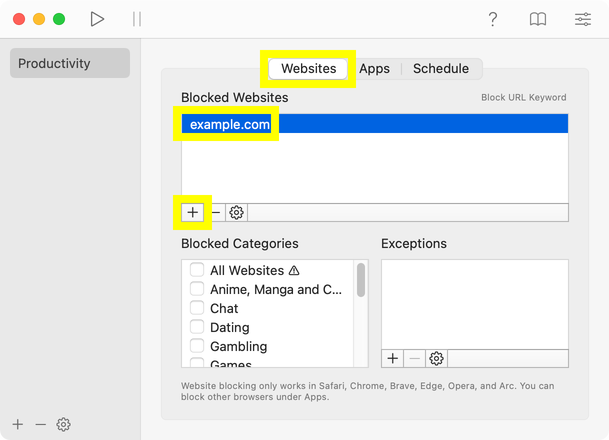
- Enter the website address you want to block, then press Enter (⏎).
- Click the Schedule tab and choose when blocking should be active:
- Start a block right away (one-time block) under Quick Start, or
- Set a schedule (recurring block):
- Click the + button under Schedule, then adjust the Start time, End time, and the frequency under Repeat.
- Test your settings before closing the 1Focus window: try visiting a website that should be blocked, and confirm that sites and apps you need are not blocked.
- Confirm the block by closing the 1Focus window.
How to Tell Blocking Is Active
- Once the block is active, you’ll see a green light next to the preset name and next to the schedule.
- While blocking is active, you won’t be able to modify your settings.
For more information, see How to block websites on Mac.
For help, contact support.